mirror of
https://github.com/aantron/dream.git
synced 2025-12-31 00:03:52 -05:00

k-websocket
In this example, the client connects to the server by a
WebSocket. They then follow a
silly protocol: if the client sends "Hello?", the server responds with
"Good-bye!". The client displays the message in an alert box:
let home =
  <html>
    <body>
      <script>

      var socket = new WebSocket("ws://localhost:8080/websocket");

      socket.onopen = function () {
        socket.send("Hello?");
      };

      socket.onmessage = function (e) {
        alert(e.data);
      }

      </script>
    </body>
  </html>

let () =
  Dream.run
  @@ Dream.logger
  @@ Dream.router [

    Dream.get "/"
      (fun _ ->
        Dream.respond home);

    Dream.get "/websocket"
      (fun _ ->
        Dream.websocket (fun websocket ->
          match%lwt Dream.receive websocket with
          | Some "Hello?" ->
            let%lwt () = Dream.send "Good-bye!" websocket in
            Dream.close_websocket websocket
          | _ ->
            Dream.close_websocket websocket));

  ]
  @@ Dream.not_found
$ dune exec --root . ./websocket.exeVisit http://localhost:8080 to get the whole exchange started!
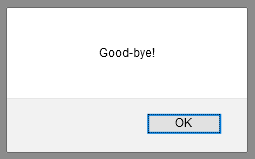
See WebSockets in the API docs.
Next steps: